伪元素counter-reset的多种用法
#css
伪元素counter-reset的多种用法的笔记
CSS content属性中有一个counter属性(计数器),而使用counter的过程中我们要使用到counter-reset来创建计数器或者重置计数器。
介绍
counter-reset属性用于创建或重置一个或多个计数器,counter-reset属性通常是和counter-increment属性,content属性一起使用。
counter-reset的属性值:
| 值 | 说明 |
|---|---|
| none | 默认。不能对选择器的计数器进行重置 |
| id number | id定义充值起的选择器、id或class。number可以设置此选择器出现次数的计数器的值 |
| ingerit | 规定应该从父元素继承counter-reset属性的值 |
使用
计数器是通过counter-reset和counter-increment操作,然后通过counter()或counters()函数来显示在页面上。
在使用
counter-reset前,必须要通过counter-reset重置一个初始值,它默认是0,你也可以指定初始值。1
2counter-reset: record; /* 重置计数器为 0 */
counter-reset: record 2; /* 重置计数器为 2 */它的值还可以是多个。
1
2
3
4
5<body>
<h2>Sam</h2>
<h2>Hbisedm</h2>
<h2>no Zoe</h2>
</body>1
2
3
4
5
6
7
8
9body{
counter-reset: first 2 second 4;
}
h3:before {
content: counter(first) "." counter(secound) ": ";
}
h3 {
counter-increment: first second;
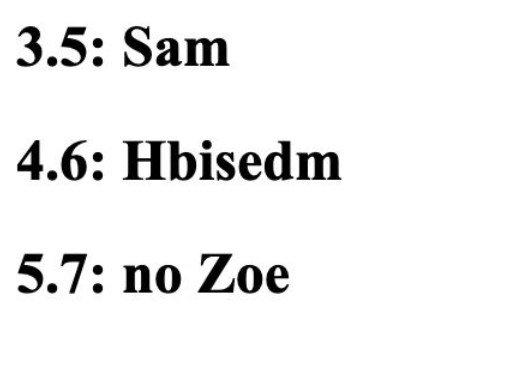
}效果图:
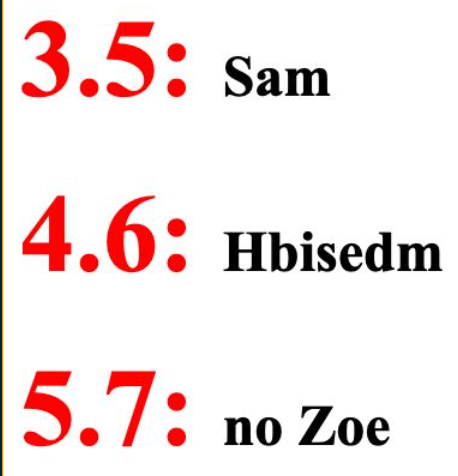
还可以通过其它的css代码来修改计数器的样式:
1
2
3
4
5h2:before {
content: counter(first) "." counter(secound) ": ";
color: red;
font-size: 46px;
}效果图:
本博客所有文章除特别声明外,均采用 CC BY-SA 4.0 协议 ,转载请注明出处!